




How MIND Handled Unique Aspects and Challenges of Integrating the Custom Application with the New ERP System
One of the unique aspects of moving from Viewpoint to Plexxis was how to best manage and accommodate the core differences between the two platforms, while accommodating what the client needed from their new integrated solution.
Technology is constantly evolving. Hitting moving targets is a reality in software development, especially with custom applications and integrations. During this build, there were a number of changes that meant evolving requirements and downstream changes throughout the development and implementation.
This meant handling change orders as best as we could in stride, coordinating with both the client and the ERP platform vendor’s technical team. We negotiated these issues with the ERP platform integration team and offered solution-oriented feedback to best adapt our integration to meet the new requirements, while still accommodating all of the client’s needs for their new ERP system and integration.
Bi-Directional Data Exchange
B.R. Kreider & Son required a new system that could exchange data bi-directionally. The Viewpoint integration was a 1-way data import, so achieving this required technical coordination with Plexxis and custom development solutions.
API Changes
In addition to evolving requirements and downstream changes as the system integration progressed, we also had to handle a change to the ERP system API midway through the project.
This required the MIND team to pause and gather new specifications from the Plexxis API development team. Although some aspects of the new API were similar and we could easily update our configuration, other aspects required more reworking and additional API calls to collect and communicate all the data the client needed.
Permission Changes and Ability to Validate Records
After the mid-integration API change in the new ERP system, permissions initially allowed us to load existing labor time logs. However, that permission ended up getting removed partway through the implementation. This restricted our ability to validate that the records we sent from the client’s custom application to the ERP system were reflected in that system properly.
Since we were not able to validate this information via standard methods prior to launch, we added the Plexxis unique identifier to a report, so that someone who has permission can manually review the records if needed. This was created to be a stopgap solution to give the client what they needed until the ERP integration team could provide what we needed for the preferred solution, and still allowed us to meet the immovable launch date.
Pre-Calculating Pay Rates Before Data Was Sent to the ERP System
During the technical evaluation and coordination, it was agreed that the ERP system would handle calculating pay rates on logged employee time. Later in the project timeline, this agreement shifted, and it was determined that pay rates would need to be pre-calculated in B.R. Kreider’s custom application before sending employee time to the ERP system.
We accommodated this change order by creating a new process to calculate the pay rates when supervisors moderated the employees’ time tickets. This required:
- Loading all the employee time logs for the pay period
- Calculating if the pay rate was standard, overtime, or hourly vs salary
- Identifying and calculating additional pay rates if the jobs were snowplowing or snowplowing on Sunday
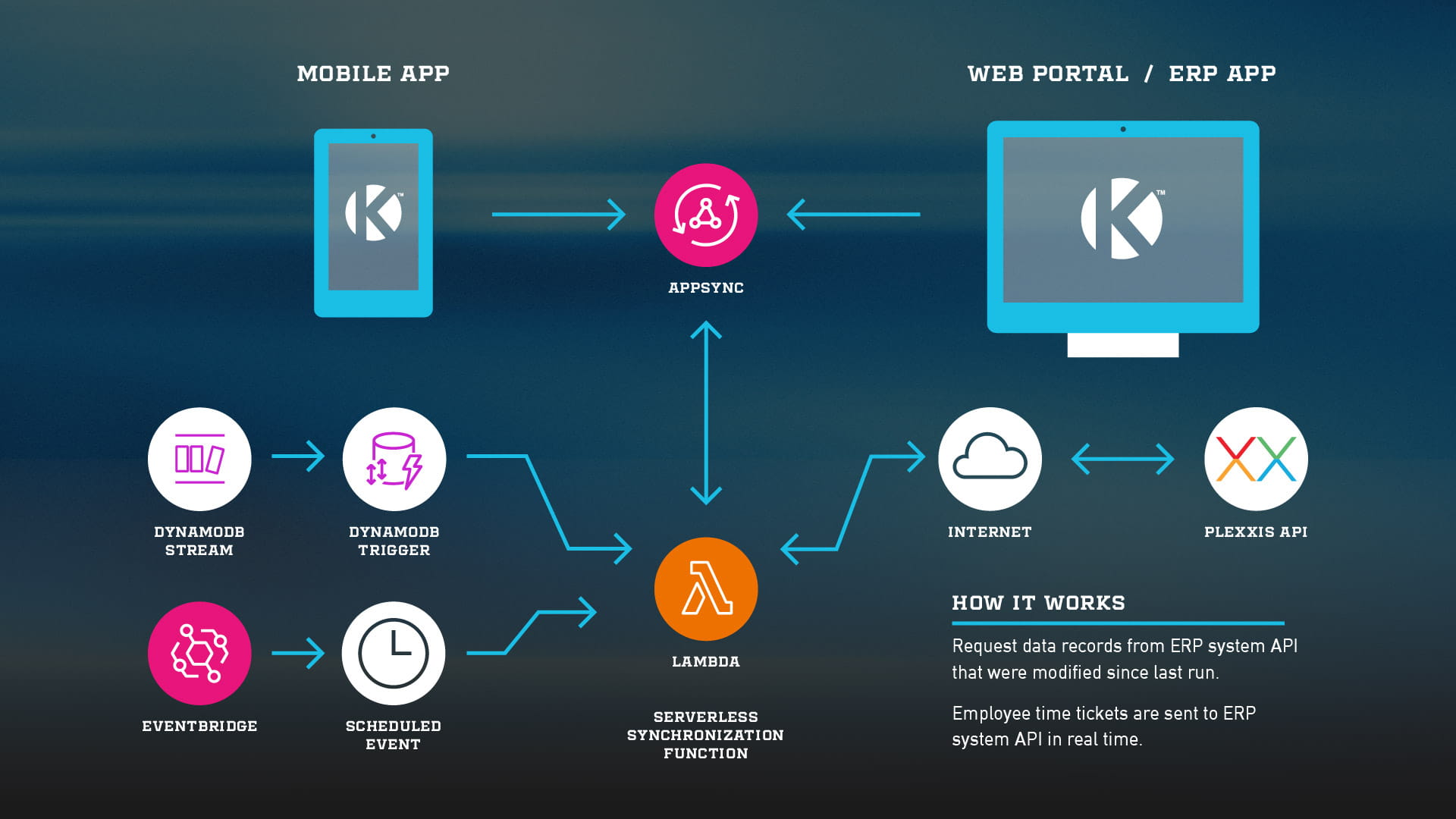
Then, when those time log records were updated with the new pay rate, we had a database trigger that would then send the update through our integration to finally update the time log in the ERP system via its API.
We implemented the process this way so that updates could be processed as efficiently as possible. Also, we leveraged the core Plexxis API integration to handle the communication, so that we didn’t have to reinvent the wheel or manage two different integration points. This helped make the integration more efficient and streamlined, while also creating a foundation for more efficient and cost-effective maintenance long-term.